
AI assistants on the service desk, digital twins of client networks and scripts that fix faults automatically have one thing in common: they work with whatever has been recorded about the client environment. That is where many MSPs struggle. In Kaseya’s 2026 State of the MSP Report, 17 per cent cite maintaining consistent client documentation as an operational problem, up from 10 per cent a year earlier, while 37 per cent already use automation for IT documentation. A technician can often spot an outdated manual by its date, or hears from a colleague how things really stand. An AI agent takes the text at face value and acts on it. Vendors such as IT Glue, Hudu, Liongard and newcomer Lexful are therefore building AI into their documentation platforms, with features that record technicians’ actions, answer questions in plain language, flag outdated documents and open up the documentation to external AI tools. This article looks at the state of documentation discipline, why AI magnifies the consequences of poor documentation, what the platforms do and what they leave undone. It ends with six agreements that make documenting a fixed part of every ticket.
In this article: What is the state of documentation at MSPs? | Why AI magnifies the consequences | What IT Glue, Hudu and the rest are doing with AI | What the tools leave undone | Six agreements for documenting in day-to-day work | Where to start
Almost every MSP has a documentation platform, and almost every MSP also has a client whose network diagram still shows the firewall from three years ago. As long as an experienced engineer knows this, the damage is limited to some searching and a phone call to a colleague. That changes the moment software starts reading the documentation. A triage agent that assigns tickets, an assistant that suggests a fix and a script that restarts a service all assume that the recorded situation is the real one. For years, documentation was an aid for people who could manage without it. Now it is the input for systems that have nothing else to go on.
What is the state of documentation at MSPs?
In November 2025, Kaseya surveyed 1,061 MSPs for the 2026 State of the MSP Report. The share struggling to create and maintain consistent client documentation rose from 10 to 17 per cent in a year. In the same list, the share struggling to demonstrate the value of the service to new clients quickly rose from 10 to 19 per cent, and the share finding experienced technicians hard to come by rose from 9 to 16 per cent. The report draws no causal link between the three. It is plausible, though, that they are connected: with fewer experienced people in-house, less knowledge sits in people’s heads, and what was never written down becomes noticeable.
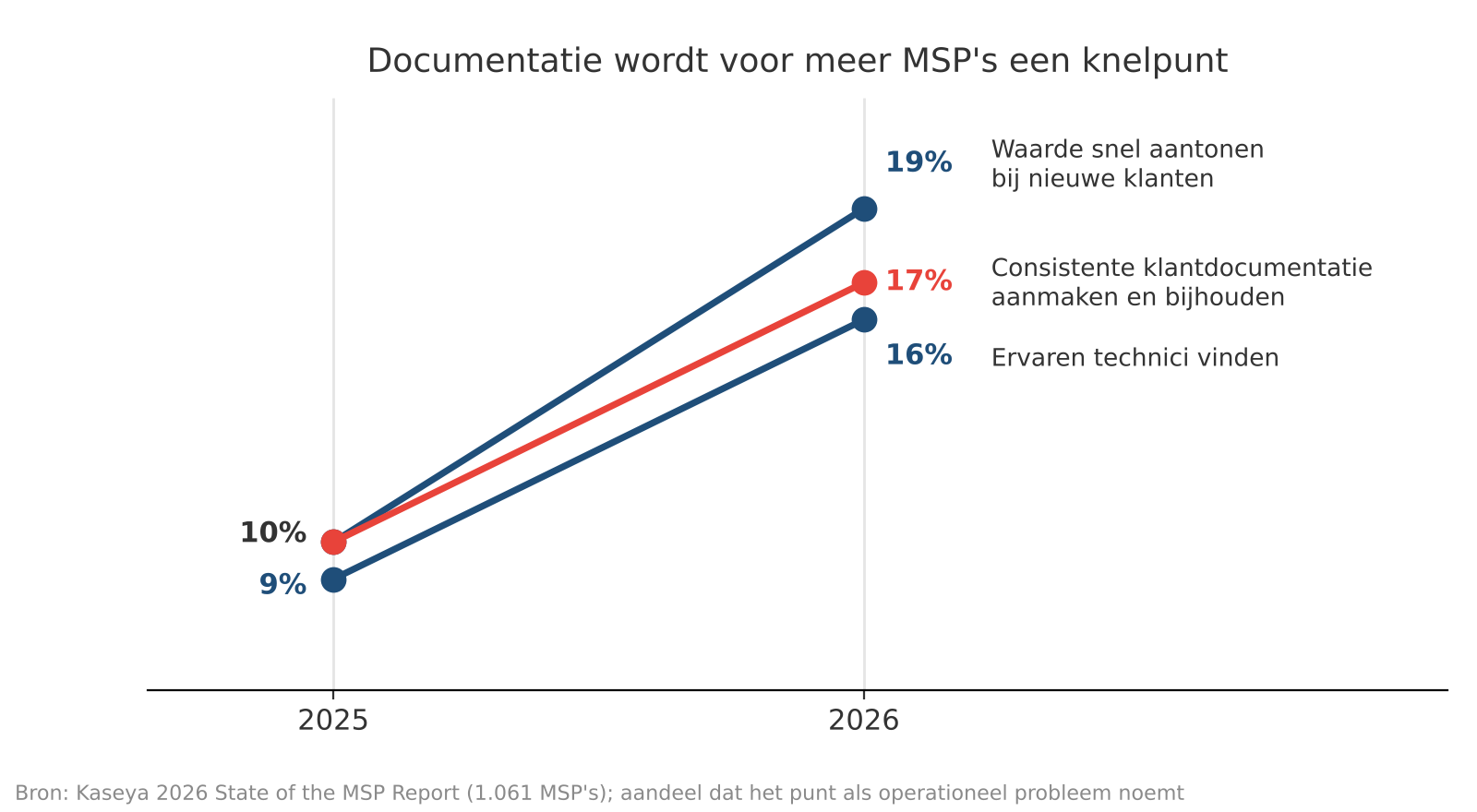
Figure 1. The share of MSPs struggling with consistent client documentation rose from 10 to 17 per cent in a year. Source: Kaseya 2026 State of the MSP Report.
And this despite documentation being one of the first areas where MSPs deploy automation. In the same survey, 53 per cent use automation for tickets, patches and monitoring, and 37 per cent for IT documentation. So automation is being built on a foundation that a growing group says is not in good order.
The Cybersecurity Report that Kaseya published this autumn, based on more than 1,100 MSPs and IT professionals in 63 countries, shows the same gap from a compliance perspective. Around 65 per cent expect to pass an audit today without preparation, while 49 per cent say incomplete documentation or policies could cause problems. Confidence in their own records exceeds what those records justify, and that is also the attitude with which many MSPs connect an AI assistant to their knowledge base.
Why AI magnifies the consequences
How information gets lost in the workplace has been measured well among software developers, a profession that, like MSP technicians, needs context all day long. In Stack Overflow’s 2026 survey, 75 per cent say they spend five hours or more a week searching for information. Respondents cite incomplete information (63 per cent), important knowledge sitting in colleagues’ heads (61 per cent), outdated information (56 per cent) and information spread across too many tools (53 per cent) as causes. One in five says AI tools have too little context. Currency is the most frequently cited characteristic of information they trust, at 73 per cent.
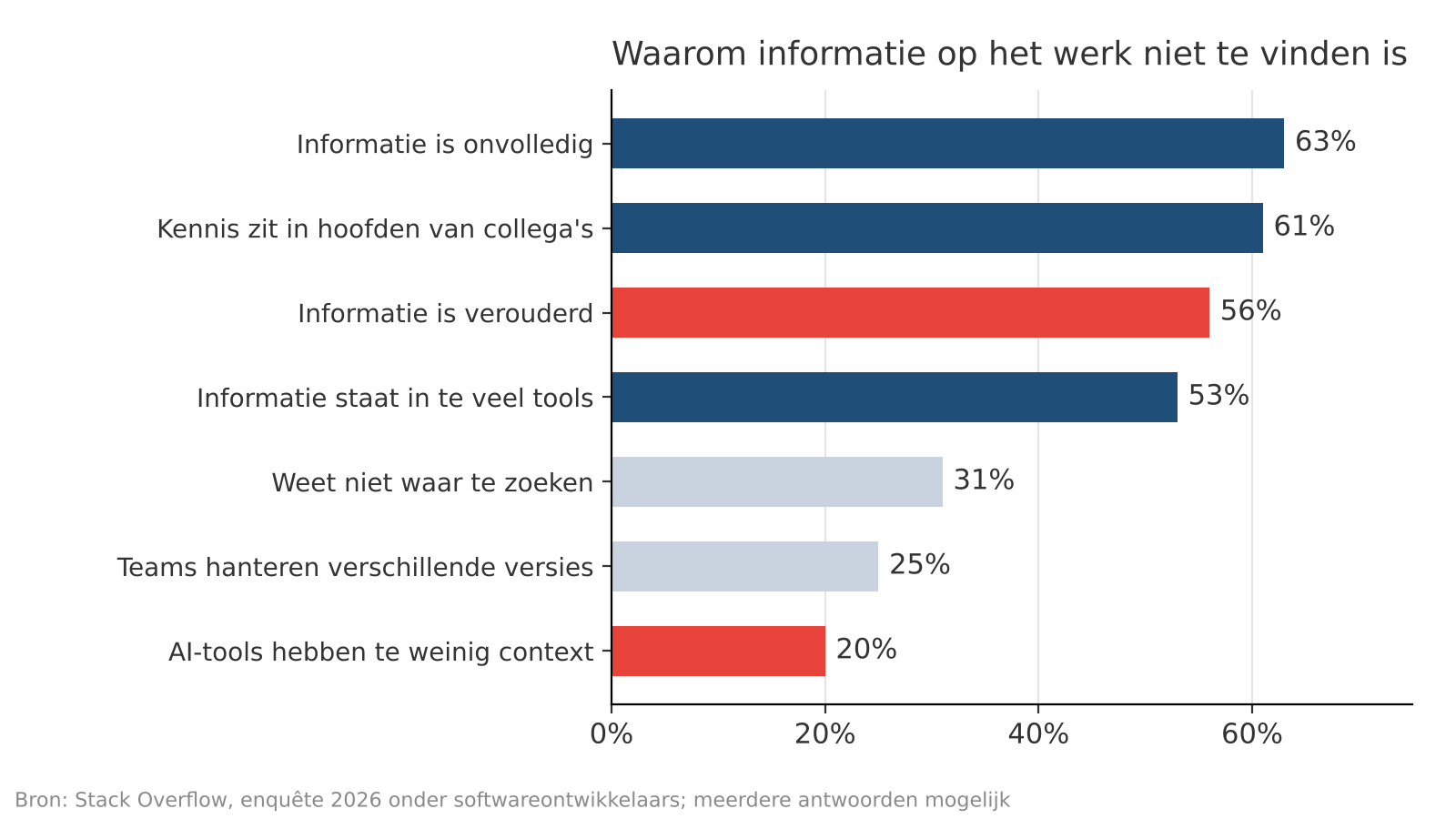
Figure 2. Incomplete information, knowledge in people’s heads and outdated information are the biggest obstacles; one in five lacks context in AI tools. Source: Stack Overflow, 2026.
A person has a workaround for all these shortcomings. They see that a document dates from 2022, hesitate and check, and AI lacks that reflex. Knowledge base vendor Slite put the question to 143 managers, and 76 per cent had experienced an AI tool retrieving an outdated document and giving a wrong answer based on it. The sample is small and the sender sells knowledge base software, yet the result matches what MSPs see in practice. An agent that routes tickets on the basis of outdated documentation makes the same mistakes as a new colleague without an induction period, only faster and without anyone hearing it in the tone of its question.
The same applies further down the chain. A digital twin of a client network calculates the effect of a change on the basis of the configurations the model has ingested and what has been recorded about how the network is supposed to work. The bottom rung of that ladder is an inventory that is accurate. A self-healing script that restarts a service assumes it is known which applications depend on that service and when a restart could do harm. If that is recorded nowhere, the automation flawlessly performs an action that an engineer who knew the client would have postponed.
Strikingly, AI is also being used to close the gap. Documentation platform Mintlify surveyed 329 companies for its State of Knowledge Report: at 83 per cent, AI agents draft documentation updates, 9 per cent let agents publish without human review, and fewer than a third consider most of their own knowledge suitable for AI. The machine can already write, then, but companies still leave vouching for the content to people.
What IT Glue, Hudu and the rest are doing with AI
The vendors of documentation platforms for MSPs acknowledge the problem and are building AI in at four points. The first is the recording itself. IT Glue, part of Kaseya and by its own account used by more than 16,000 organisations, has the Smart SOP Generator: a browser extension that records a technician’s clicks and keystrokes and turns them into a work instruction with screenshots. According to Kaseya, this produced more than 100,000 procedures in the first six months. Hudu has a similar screen recording in its browser extension. Liongard takes a different approach and reads configurations directly from the client’s systems, so that the inventory moves with reality. Lexful, launched in February 2026 with funding from the investment vehicle of IT Glue founder Chris Day, promises documentation that creates and updates itself.
The second is finding information. In April at Kaseya Connect Global, Kaseya announced the assistant Kaseya Assist for IT Glue, with which technicians ask questions in plain language and have runbooks drafted. Hudu has the assistant Hudini, which can summarise a knowledge base article or draft a new one from a pasted ticket. Liongard calls its version Roar Assistant and Lexful calls its own Ask Lex.
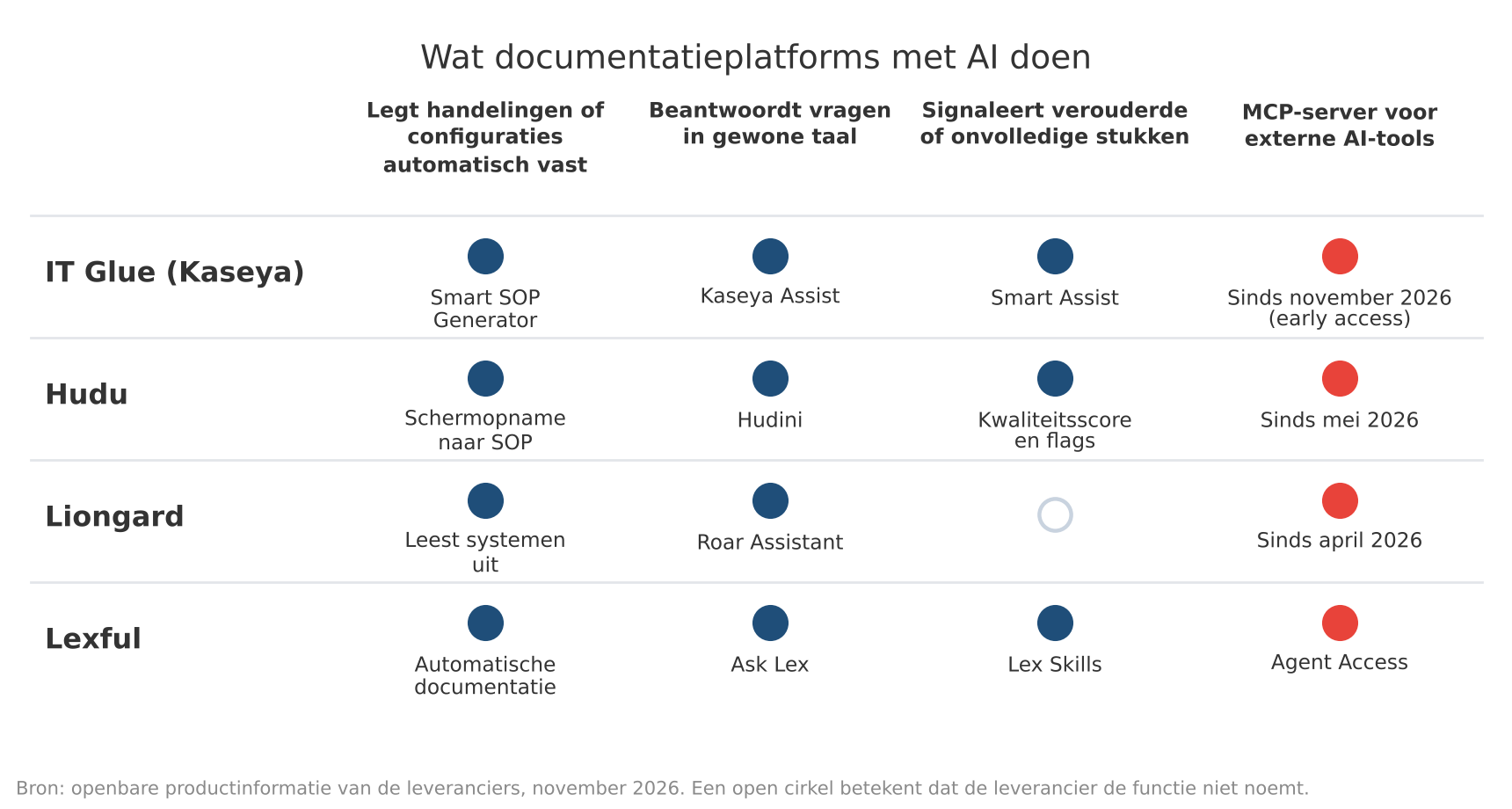
Figure 3. All four platforms offer recording, question-answering and an MCP server for external AI tools; IT Glue, Hudu and Lexful flag outdated documents. Source: vendor product information, November 2026.
The third is clean-up. Smart Assist in IT Glue identifies outdated and duplicate documents and shows which documents are used most. Hudu gives each client environment a quality score based on how completely the standard templates have been filled in, and lets users flag records for review. Lexful uses Lex Skills for this, which flag outdated information and put every change to a person first. The fourth is the newest: opening up the documentation to external AI. Since May 2026, Hudu has shipped with an MCP server, which allows tools such as Claude, ChatGPT and Microsoft Copilot to read, create and edit knowledge base articles within the user’s permissions. In April, Liongard did the same for its inventory data. Kaseya followed on 17 November with its own MCP servers for IT Glue, Autotask and Datto RMM. For IT Glue, these come with six ready-made skills, including one that tracks down gaps and outdated records in the documentation. The servers are available in early access for the time being, and in that phase Kaseya officially supports only Claude Desktop and Claude Code. Lexful also has an MCP connection that tools such as Claude, ChatGPT and Copilot can connect to.
The packaging differs. With IT Glue, the AI features of Cooper Copilot are in the most expensive plan, which according to a recent comparison costs 44 dollars per user per month. Hudu charges 27 dollars per user with the AI features included, although for Hudini the MSP must supply its own API key from OpenAI, Azure OpenAI or Grok and pay for that usage separately. Lexful charges per client rather than per user.
What the tools leave undone
The features take over the heaviest part of the writing, which is a gain for a profession that puts off documenting until the busy period is over, but they leave four things unresolved.
A recording captures what the technician did, including when that was a detour or contained a mistake. The procedure then looks official, with screenshots and a tidy layout, and is treated as the standard by the next colleague and by the AI assistant. Someone therefore has to judge whether the recorded way of working is the desired one.
Much of what makes a client environment distinctive never happens on a screen. Why the accounting server must not restart on a Friday afternoon, which director will not accept an MFA prompt and which supplier must be called when the point-of-sale system fails appears in no recording, and that is the part of the knowledge that someone still has to write down.
Flagging old documents finds those that have not been touched for a long time. A document edited last month that still gives a wrong IP address does not make the list, while a 2021 procedure that is still correct does. Age is an indication of inaccuracy, not a measurement of it.
Finally, an MCP server or your own API key passes client data to an AI provider. Security company Blacksmith pointed out in September that an AI tool processing client data can be a sub-processor under Article 28 of the GDPR, for which the MSP needs the client’s permission and remains liable. An assistant that is allowed to write in the documentation also calls for the same care as a new employee with write access: limited permissions, a log and review before a change becomes final.
Six agreements for documenting in day-to-day work
Six agreements that make documentation part of the work
1. A ticket is closed when the documentation is correct. Add one mandatory question to closing a ticket: was the documentation you used correct, and if not, has it been updated? That takes half a minute per ticket and catches errors at the moment someone sees them.
2. Every client has the same structure. Use the same templates and mandatory fields for all clients. A technician can then find their way around any client, and an AI assistant knows where the answer should be.
3. Every document has an owner and a review date. A procedure with no name under it is updated by nobody. Have the platform alert the owner when the date passes.
4. Exceptions get a fixed place. Create one page per client for arrangements that fit nowhere else, such as maintenance windows, sensitive users and supplier contacts. Ask about it at every quarterly meeting.
5. AI writes the draft and a person approves it. Let recordings and assistants do the groundwork, and only make a procedure visible to colleagues and to agents after a second technician has reviewed it.
6. Measure what is missing. Keep track of which search queries in the platform return nothing and which clients have the lowest completeness scores. Start the clean-up with the clients that raise the most tickets.
Where to start
Documentation projects usually fail in the same way. A week is set aside, two engineers bring the largest clients up to date, and three months later there is a backlog again because the day-to-day work has stayed the same. Reverse the order: habit first, then catching up. If every closed ticket includes a check of the documentation used, the documentation of the busiest clients becomes reliable first, and those are also the clients for whom an AI assistant will do the most work.
That gives a usable yardstick for deploying AI. Blacksmith recommends classifying clients by how reliable their data is and tailoring automation accordingly. A client with a complete and recently verified environment can be given an agent that acts on its own. For a client where half the fields are empty, the same agent only makes suggestions to a technician. That makes the quality of the documentation visible as a condition for the automation the client receives, and for engineers that is a better reason to keep it up to date than an appeal from management.
Sources Kaseya 2026 State of the MSP Report (pdf); Stack Overflow, 2026 survey, knowledge and context section; Mintlify, 2026 State of Knowledge Report; Kaseya, announcements from Kaseya Connect 2026 with Kaseya Assist for IT Glue; Hudu, release 2.42.0 with the MCP server (14 May 2026); Business of Tech on the launch of Lexful (4 February 2026); Kaseya, announcement of MCP servers for Autotask, Datto RMM and IT Glue (17 November 2026); Lexful, product information on Lex Skills and the MCP connection.
This article was originally published in Dutch on MSP Business. Read the original →