Phishing and malware are increasingly getting in through an ordinary browser session, slipping past the email filter, the firewall and endpoint security. Vendors offer three types of solution: browser isolation, a separate enterprise browser and a security extension in the existing browser. This year, the major security platforms have been buying up one specialist after another. For SME clients, however, the first gains are closer to home. Chrome and Edge can be centrally managed at no extra cost, yet in many environments this barely happens, and almost every employee has installed extensions that nobody looks at. As an MSP, you can first set up the browser as a managed part of the workplace and then add isolation or extra protection where it is needed.
In this article
Why do attackers choose the browser?
Three ways to secure the browser
Gartner expects a quarter of organisations by 2028
What does the client already have?
AI in the browser makes the problem bigger
In the first quarter of 2026, one in five phishing links that employees actually clicked on went undetected by their employer’s URL filtering. That is according to Menlo Security, based on millions of browser sessions at business customers. A third of the hard-to-detect threats came from sites classed as safe, and the company counted more than 52,000 threats on domains such as Google Drive, Dropbox and SharePoint. ‘The tools most organisations rely on are doing what they were designed to do, and that’s the problem,’ says CEO Bill Robbins.
Menlo sells browser security itself, so its figures should be taken with a pinch of salt. More independent is Verizon’s Data Breach Investigations Report 2026, in which credential abuse plays a role in 39 per cent of data breaches and phishing is the initial step in 16 per cent of cases.
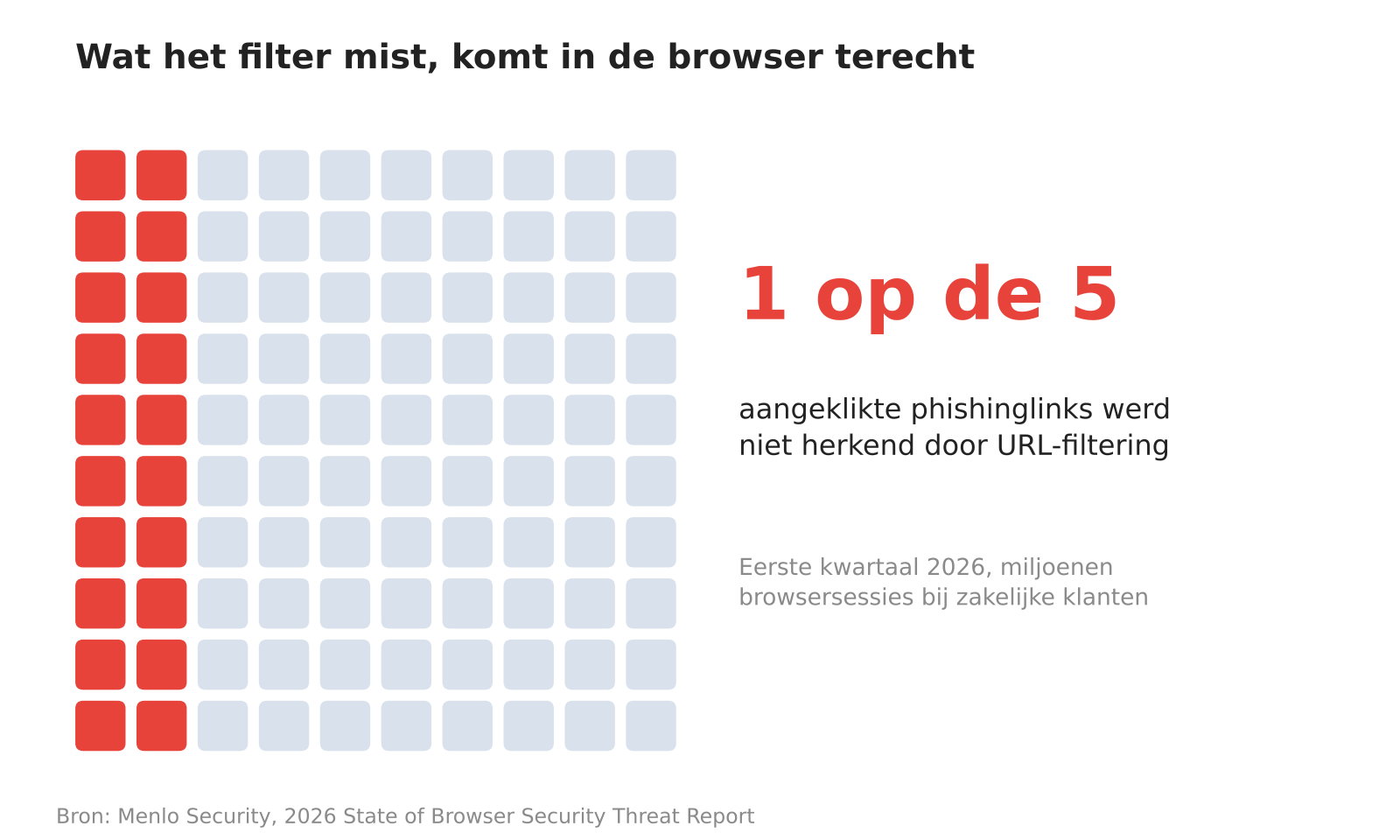
Figure 1. One in five clicked phishing links went unrecognised by URL filtering in the first quarter of 2026. Source: Menlo Security, 2026 State of Browser Security Threat Report.
Why do attackers choose the browser?
Most office workers do their work in SaaS applications, and the browser is where the login, the data and the user come together. A phishing page that is only assembled in the browser, a malicious file in an encrypted archive or a fake login page on a trusted cloud domain remains invisible to a network filter. According to Menlo, a quarter of the files it neutralised were password-protected, a well-known way of evading scanners.
Stolen sessions and passwords then become a tradeable commodity. In Verizon’s data, half of ransomware victims had been affected by leaked credentials or an infostealer in the 95 days before the attack.
Three ways to secure the browser
Remote browser isolation (RBI) is the oldest approach. The web page is loaded in the cloud and the user only sees the image, either as a video stream or as a sanitised copy of the page. As a result, malicious code never reaches the device. This does, however, mean latency, extra bandwidth and sites that perform poorly in isolation, which is why in practice RBI is mainly used for unknown or risky sites.
The enterprise browser is a full Chromium-based browser with built-in policy, logging and data loss prevention. The organisation decides per application whether the user may copy, download and print. Island is the best-known provider and raised funding at a valuation of $4.8 billion in March 2025. Palo Alto Networks bought Talon in 2023 and sells that technology as Prisma Browser. Sophos built its Protected Browser on Island’s engine and made it available to MSPs as well earlier this year.
The third approach leaves the browser in place and adds an extension or agent that monitors the session. CrowdStrike paid $420 million for Seraphic in January, Zscaler acquired SquareX in February and Akamai announced in May that it was buying LayerX for around $205 million. ‘By decoupling security from the browser itself, we can turn any browser into a secure enterprise browser,’ CrowdStrike CEO George Kurtz said at the time of the acquisition.
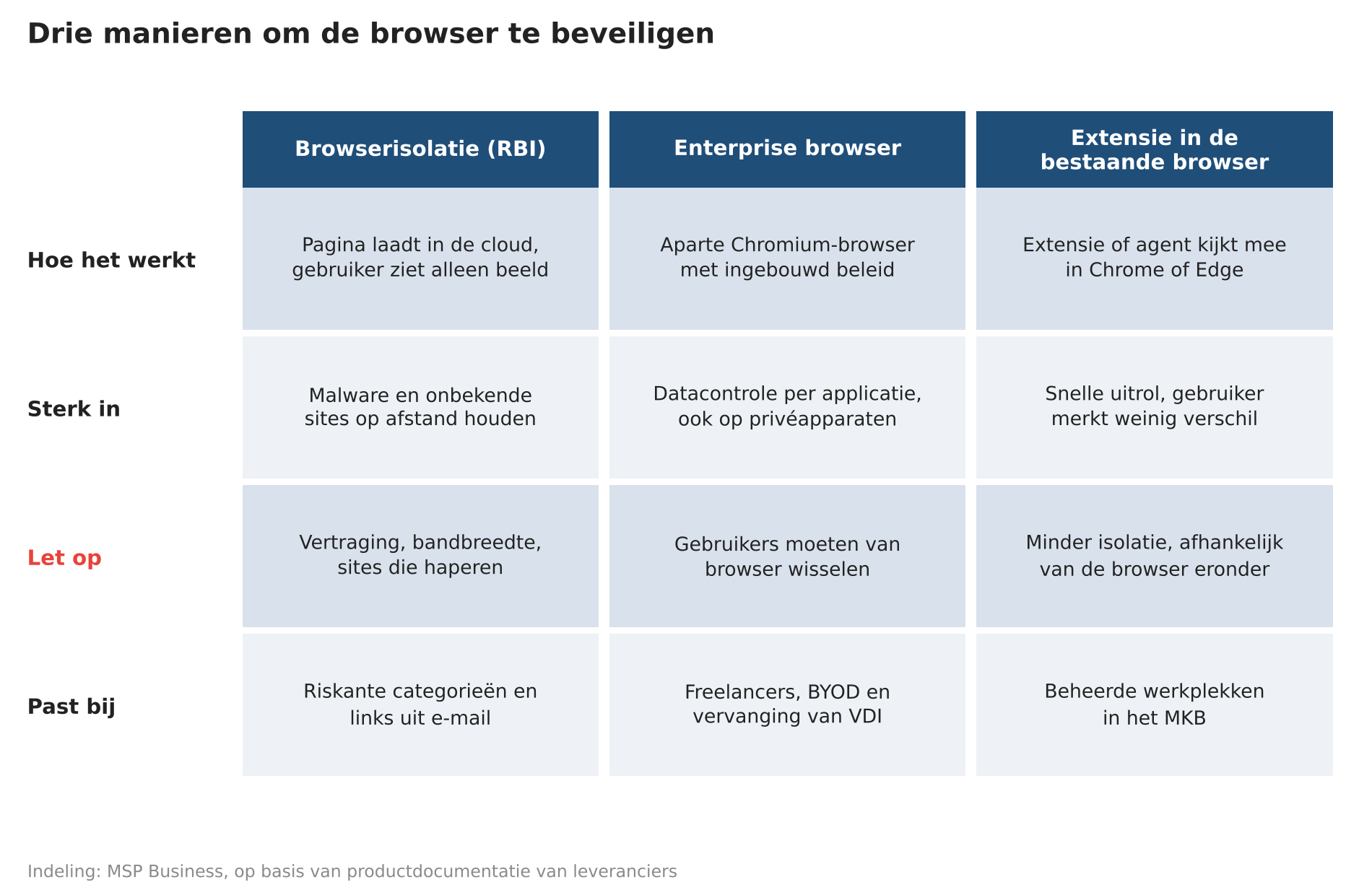
Figure 2. The three approaches side by side. Classification: MSP Business.
Gartner expects a quarter of organisations by 2028
In February, Gartner published a Market Guide for secure enterprise browsers. The firm expects a quarter of organisations to be using such technology alongside their existing remote access tools by 2028, compared with around 10 per cent today. The number of client enquiries on the subject doubled between 2023 and 2025. By 2029, 30 per cent of companies would be using the technology to get a grip on browser extensions.
For MSPs, the wave of acquisitions is the most important signal. Browser security is becoming part of the platforms they already buy, alongside endpoint security and zero trust access, and within a year or two it will probably need to be purchased as a standalone product less and less often.
What does the client already have?
Chrome and Edge can both be managed centrally without an additional licence. With Chrome Enterprise Core, Google offers free cloud management with more than a hundred policy settings, reporting on versions and extensions, and controlled rollout of updates. According to Google’s product page, the paid Premium version costs $6 per user per month and adds data loss prevention, file scanning and real-time phishing detection.
Microsoft links Edge for Business to Intune and Purview. This lets you enforce on personal devices that business applications only open in a managed Edge environment. The heavier controls, such as blocking sensitive prompts to AI services, require an E5 licence.
Little use is yet made of these options. LayerX analysed extensions on more than a million business devices and found that 99 per cent of users have installed at least one extension. For 72 per cent, this includes an extension that has not been updated for more than a year. Roughly three quarters of all extensions request permissions that LayerX classifies as high or critical.
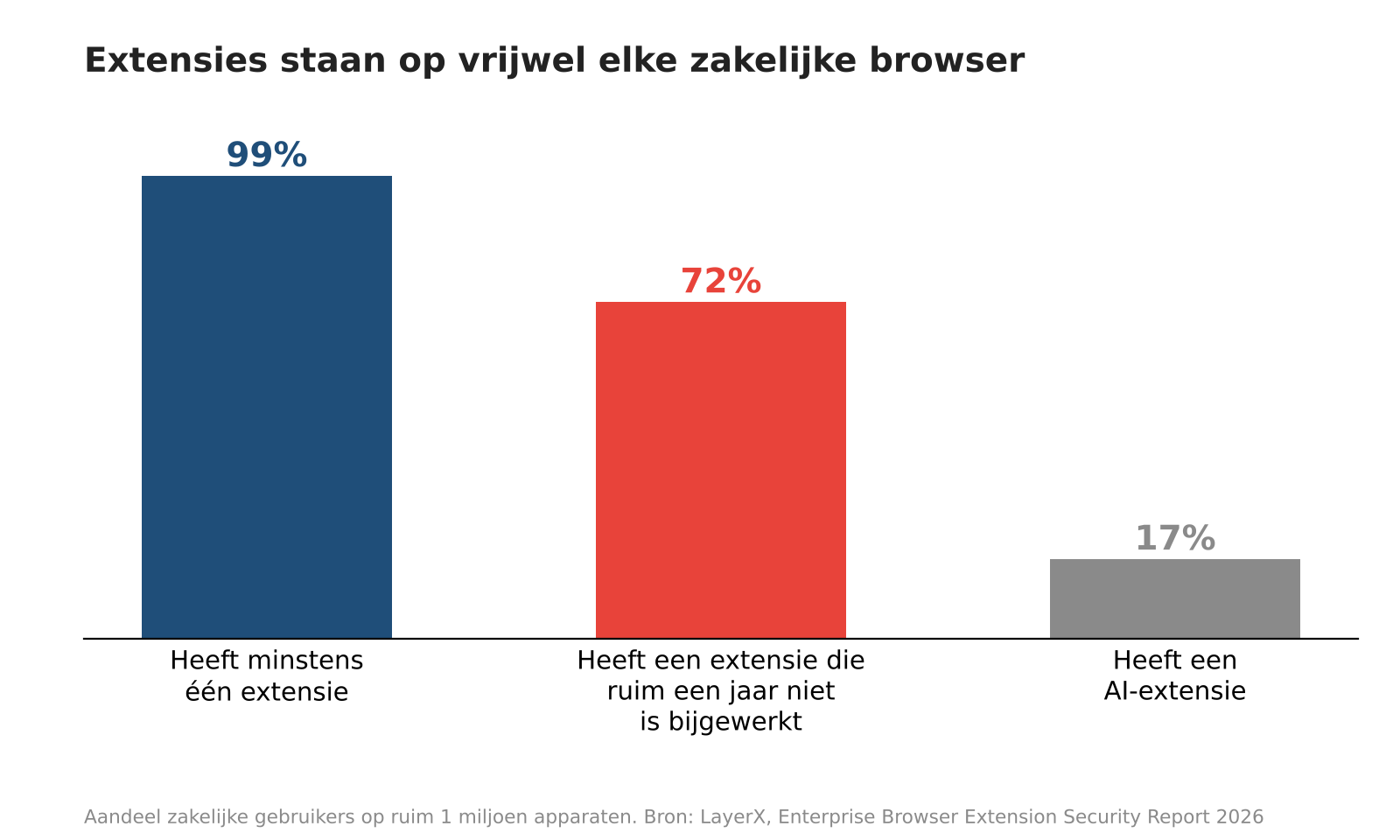
Figure 3. Almost every business user has installed extensions, and for 72 per cent these include one that has not been updated for more than a year. Source: LayerX, Enterprise Browser Extension Security Report 2026.
AI in the browser makes the problem bigger
According to the Verizon report, 67 per cent of employees who use AI services on a business device do so with a personal account. According to LayerX, one in six business users has installed an AI extension.
In December 2025, Gartner advised blocking AI browsers such as Perplexity’s Comet and OpenAI’s ChatGPT Atlas for the time being. The analysts point to prompt injection, in which hidden instructions on a web page make the agent do something the user never asked for, and to sidebars that send the content of open tabs to a cloud-based AI service. OpenAI has since halted development of Atlas and switched to an extension for Chrome.
The security risks are not limited to specialised AI browsers. Existing browsers are also increasingly gaining AI functionality through extensions. The ChatGPT extension for Chrome, for example, can now analyse web pages and perform actions on users’ behalf. This creates similar risks around data protection, prompt injection and unauthorised actions.
Where should an MSP start?
The first step is to designate one browser as the standard and manage it centrally, with automatic updates, a list of permitted extensions and a work profile kept separate from the personal profile. For most clients, this requires no licence and removes a large part of the extension risk.
The second step is in-session protection for the groups most at risk, such as finance, senior management and administrators. This can be done with the Premium version of Chrome, with the Microsoft licences the client already has, or with the browser module of the security platform you already supply. Isolation makes sense here for opening unknown sites and links from email.
A separate enterprise browser comes into the picture when the client works extensively with unmanaged devices, for example those of freelancers, temporary staff or an acquired company. There, the browser replaces a virtual desktop or a VPN, and that is the cost you weigh it against.
As a service, browser security fits into the existing workplace bundle. You report monthly on versions, extensions and blocked pages, and you have an answer when the client asks what happens to the link that someone clicks on anyway.
Sources Menlo Security, 2026 State of Browser Security Threat Report (June 2026); Verizon Data Breach Investigations Report 2026, analysis by Push Security; Verizon Data Breach Investigations Report 2026, analysis by Keep Aware via BleepingComputer; CrowdStrike, explainer on remote browser isolation; ChannelE2E, Island raises $250M at $5B valuation (March 2025); Sophos, Sophos Protected Browser early access and FAQ; SecurityWeek, CrowdStrike to acquire browser security firm Seraphic for $420 million; SiliconANGLE, Zscaler snaps up SquareX (February 2026); SecurityWeek, Akamai to acquire AI and browser security firm LayerX for $205 million; Green Abstracts, Enterprise browser acquisitions plug the hole in security platforms; Gartner, Market Guide for Secure Enterprise Browsers (February 2026), via Palo Alto Networks; PCG, Chrome Enterprise Core vs Premium (July 2026); Microsoft, New advanced data protection for BYOD and AI in Edge for Business; LayerX, Enterprise Browser Extension Security Report 2026; The Register, Block all AI browsers for the foreseeable future: Gartner (December 2025).
This article was originally published in Dutch on MSP Business. Read the original →